

DeepSeek-V4.1-Flash on one 96 GB GPU
This guide runs DeepSeek-V4.1-Flash, a 763-billion-parameter mixture-of-experts model, on a private worker with one NVIDIA RTX PRO 6000 Blackwell (96 GB) and the server’s RAM. The engine is the open source deepseek-one-gpu (MIT, built on Strata). It runs on InferenceKey as a custom backend: you publish it once with the SDK, pin a workload to your worker, and call it from anywhere through an OpenAI-compatible endpoint behind your API keys. The model and its weights never leave your machine.
What you get, measured on an RTX PRO 6000 Blackwell Server Edition (results):
| Users at once | Total tokens/s | Per user |
|---|---|---|
| 1 | 63.11 | 63.11 |
| 4 | 127.58 | 31.87 for the slowest |
| 8 | 152.53 | about 19 |
How it fits on one card
The model is 264.5 GB even at 2 bits (Q2_K), and the card has 96 GB. For every token, each layer picks 6 of its 384 experts, and some experts are picked far more than others. The engine keeps the attention, the dense layers and the 5,825 most used experts (69.5 GiB) in VRAM; the other 9,535 experts (113.9 GiB) stay in pinned RAM, where CPU threads compute them while the GPU works. In the measured runs about 9 in 10 expert picks were already on the GPU, and the hot set follows the traffic. Video: 0:55.
Before you start
Video: 1:35
The worker (the GPU box registered in your InferenceKey project) needs:
| GPU | One NVIDIA RTX PRO 6000 Blackwell, 96 GB. NVIDIA driver 580.65 or newer (CUDA 13). The engine bundles its CUDA runtime. |
| RAM | About 280 GB. The backend’s placement step refuses a host that cannot hold the minimum layout. |
| Disk | About 300 GB free for the model, under the worker user’s ~/.cache/deepseek-one-gpu (or DSV41_CACHE_DIR). |
| Software | CPython 3.11 to 3.13 for the backend environment, and numactl (else taskset) to bind the engine to the GPU’s NUMA node. |
Your laptop needs Python 3.10+ and pip install inferencekey openai. No GPU.
From the dashboard you need:
- An SDK token with the scopes
workload:readandworkload:write. The token wizard does not tickworkload:readby default: tick it. See Tokens. - An API key for calling the endpoint (created in step 5).
- Your project slug and your worker id (Workers page).
-
Get the integration
Terminal window git clone https://github.com/inferencekey/deepseek-one-gpu.gitcd deepseek-one-gpu/integrations/inferencekeypip install inferencekey openaicp .env.example .envFill in
.env:.env INFERENCEKEY_SDK_TOKEN=ik_sdk_... # control plane: workload:read + workload:writeINFERENCEKEY_API_KEY=ik_live_... # data plane: the key that calls the endpointINFERENCEKEY_PROJECT=your-project-slugIK_WORKER_ID=... # the worker with the RTX PRO 6000What is in the folder:
backend.py: the custom backendDeepSeekOneGpuBackend.publish.py: packagesbackend.pywith the engine’s Python side (server, placement tool, two data files; about 300 KB, no weights, no binary) and publishes it to your tenant.main.py:ensure()a fixed workload on your worker, wait until ready, ask one question, anddelete()unlessIK_KEEP_ALIVE=1.requirements.txt: what the worker installs in the backend’s isolated environment.
-
Publish the custom backend
Video: 4:36
Terminal window python publish.pyIt publishes the slug
deepseek-v41-flash-one-gpu, task typetext2text. You do this once per version. It shows up under Platform Management, Custom backends: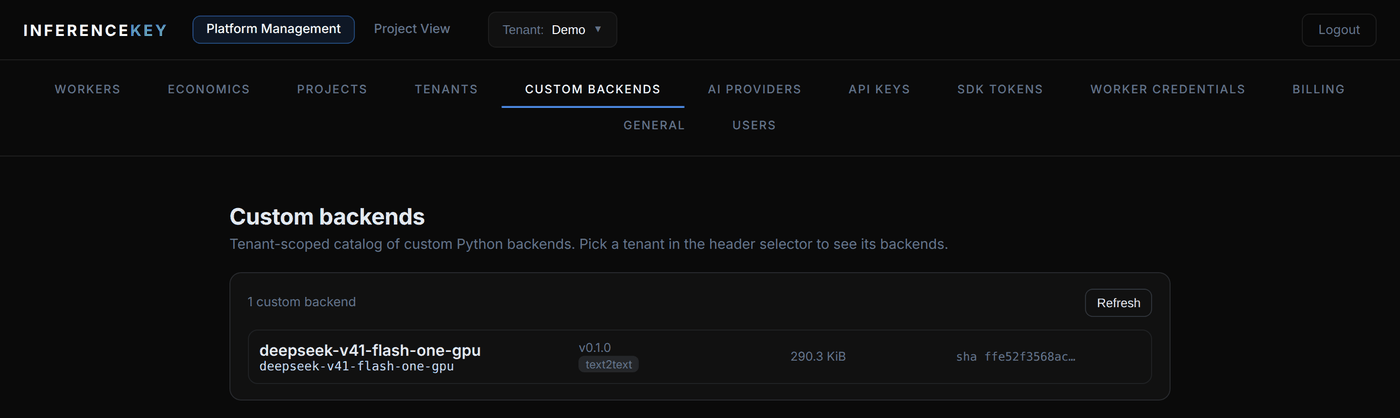
If you prefer the dashboard,
publish.pyalso leaves the package indist/; drag that.tar.gzinto the Custom backends page. Both paths publish the same thing. See Custom backends for the contract. -
Pin a workload to your worker
Terminal window IK_KEEP_ALIVE=1 python main.pymain.pydeclares the workload and lets the platform reconcile it:main.py (the part that matters) import osfrom inferencekey import ExecutionPolicy, ManagementClient, WorkloadSpecmgmt = ManagementClient.from_env()spec = WorkloadSpec(name="DeepSeek-V4.1-Flash on one RTX PRO 6000",slug="deepseek-v41-flash",model="vcruz305/DeepSeek-V4.1-Flash-GGUF",backend="deepseek-v41-flash-one-gpu", # the custom backend slugtask_type="text2text",worker_id=os.environ["IK_WORKER_ID"], # private workerexecution_policy=ExecutionPolicy.FIXED, # one always-on replica on your GPU)mgmt.ensure(spec)It then waits up to
IK_READY_TIMEOUTseconds (default 7200) for the first start.IK_KEEP_ALIVE=1keeps the workload after the script ends, which is what you want for a service. The same workload from the Create workload form: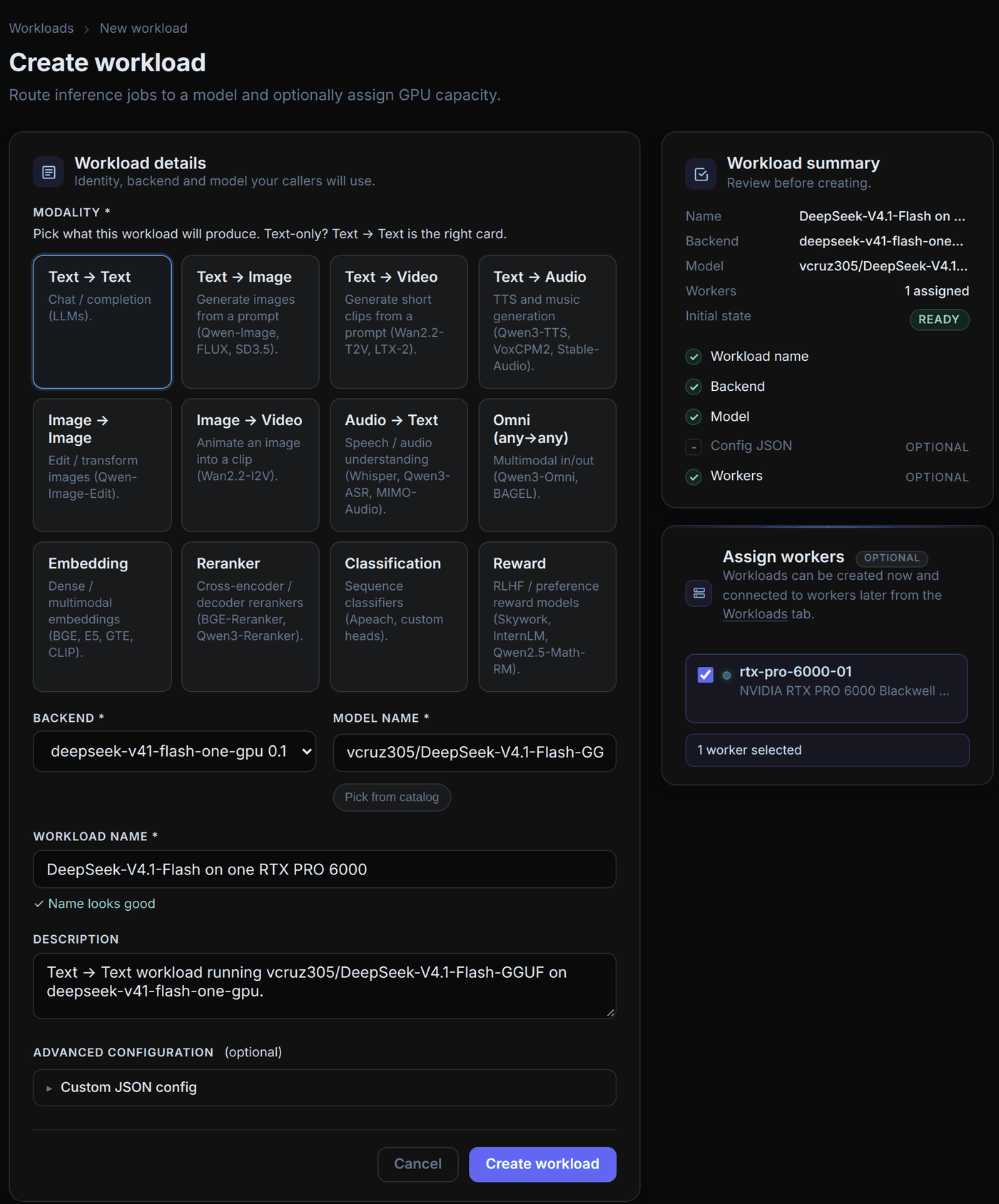
-
Watch the worker start the engine
Video: 1:56 shows the same steps by hand with
run.sh.On the worker, the backend’s
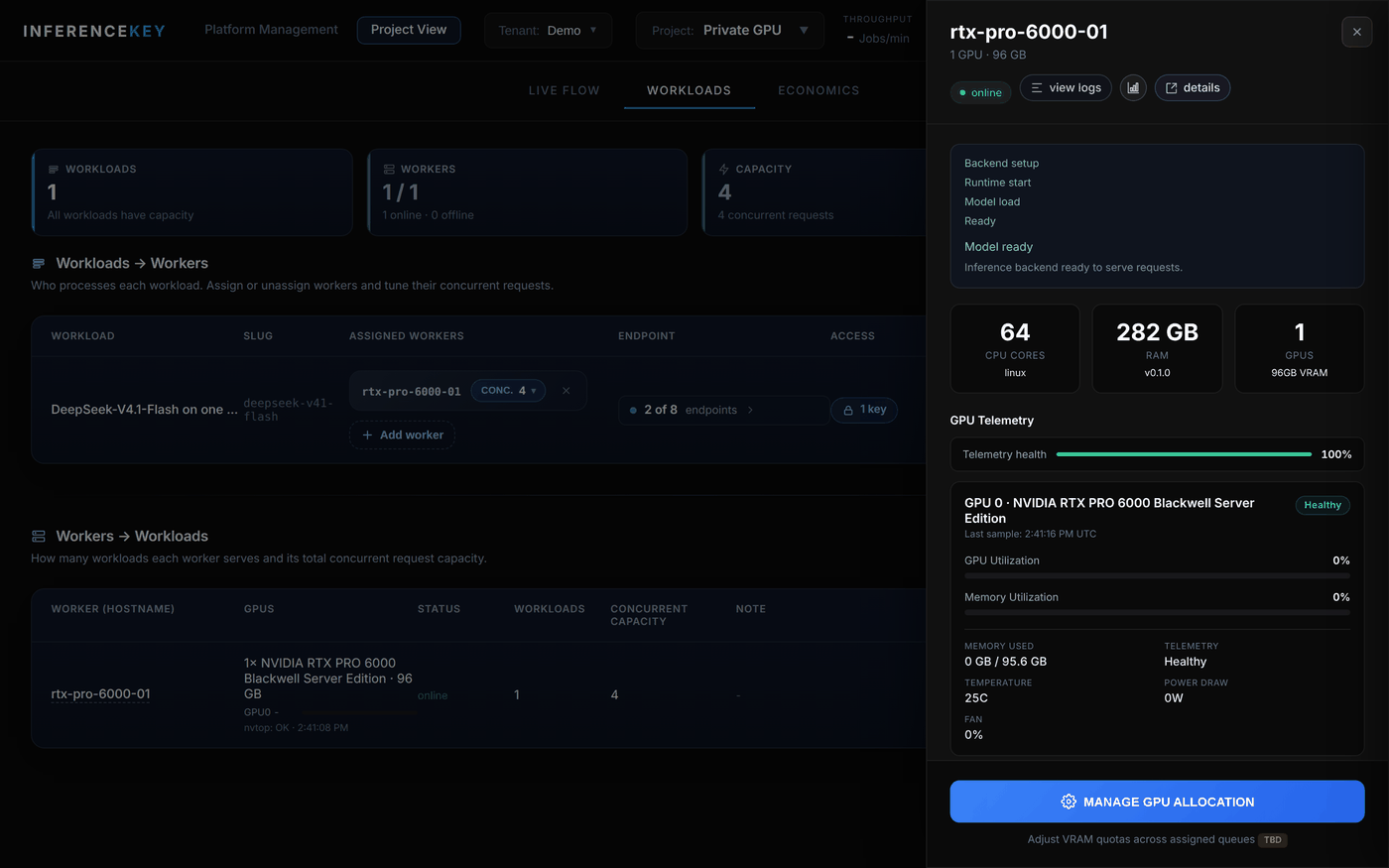
setup():- checks the GPU and the driver;
- downloads the prebuilt engine from release v0.1.0 and checks its sha256, and downloads the GGUF at a pinned revision, both in parallel;
- plans which experts go to VRAM from your VRAM and RAM;
- starts the server on a loopback port, bound to the GPU’s NUMA node;
- waits for
/health.
The worker’s drawer follows it to Model ready:
-
Give an API key access
On the Workloads page, open the workload’s Access column, tick (or create) the API key and save. The dialog shows the endpoint:
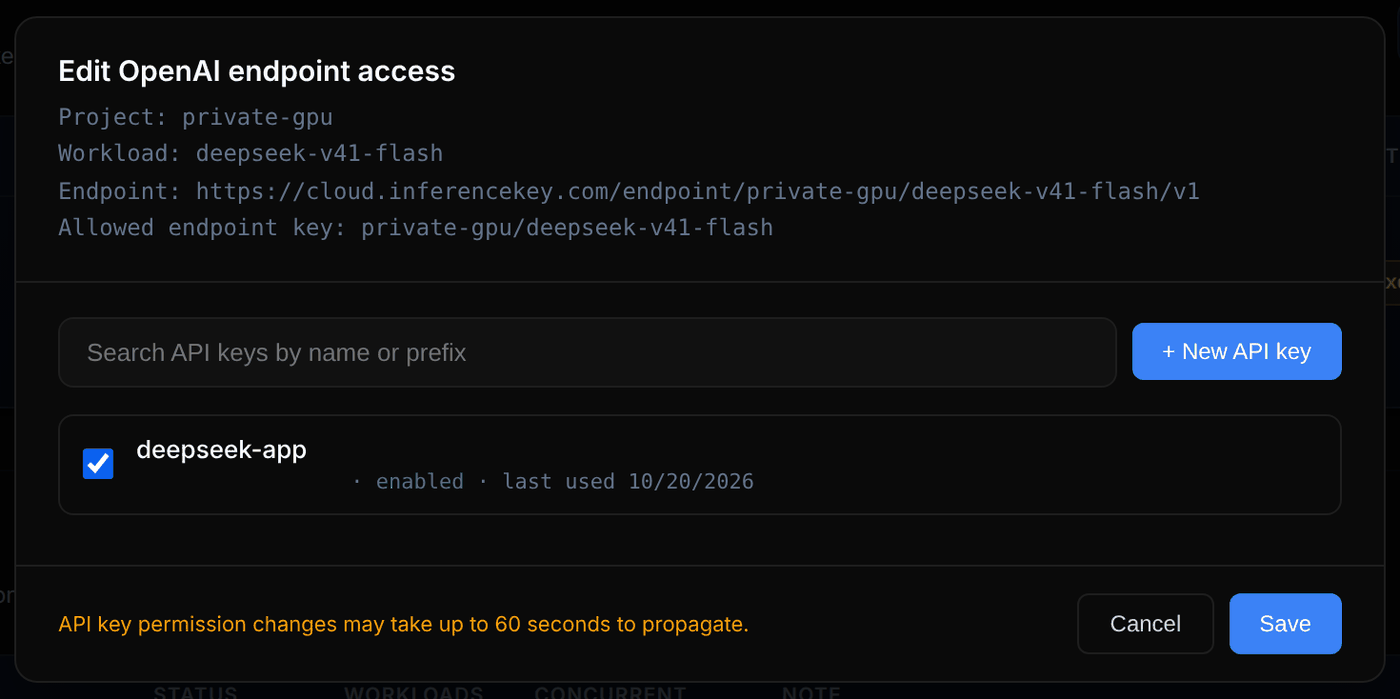
The workload answers chat completions (and Anthropic messages):
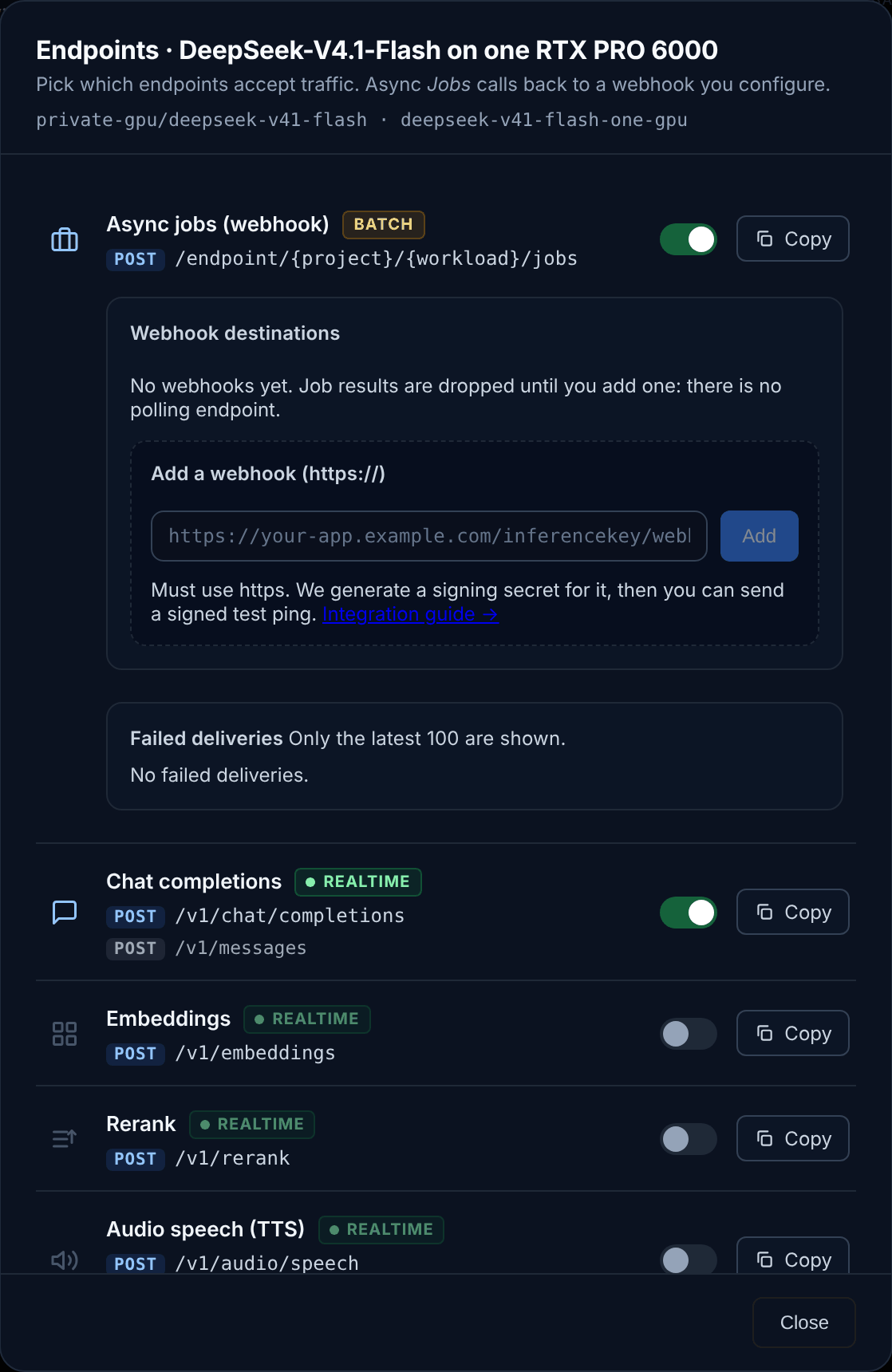
-
Call it with the openai client
The endpoint is
https://cloud.inferencekey.com/endpoint/<project>/deepseek-v41-flash/v1and the model name isdefault:call.py import jsonfrom openai import OpenAIclient = OpenAI(base_url="https://cloud.inferencekey.com/endpoint/<project>/deepseek-v41-flash/v1",api_key="ik_live_...",)completion = client.chat.completions.create(model="default",messages=[{"role": "user", "content": "Explain mixture-of-experts models in two sentences."}],max_tokens=400,)out = json.loads(completion.choices[0].message.content) # the backend's own objectprint(out["text"])print(out["usage"], out["timings"])A custom backend answers with its own JSON object as the message content:
{text, reasoning, finish_reason, usage, timings}. The real token counts and speeds are inside it. -
Serve 4 users at once
Video: 3:19
The engine decodes up to 8 requests in the same step, but a workload pinned with
ensure()starts with concurrency 1: InferenceKey sends the worker one request at a time. On the Workloads page, click the worker’sCONC. 1pill, set Concurrent requests to 4 and save: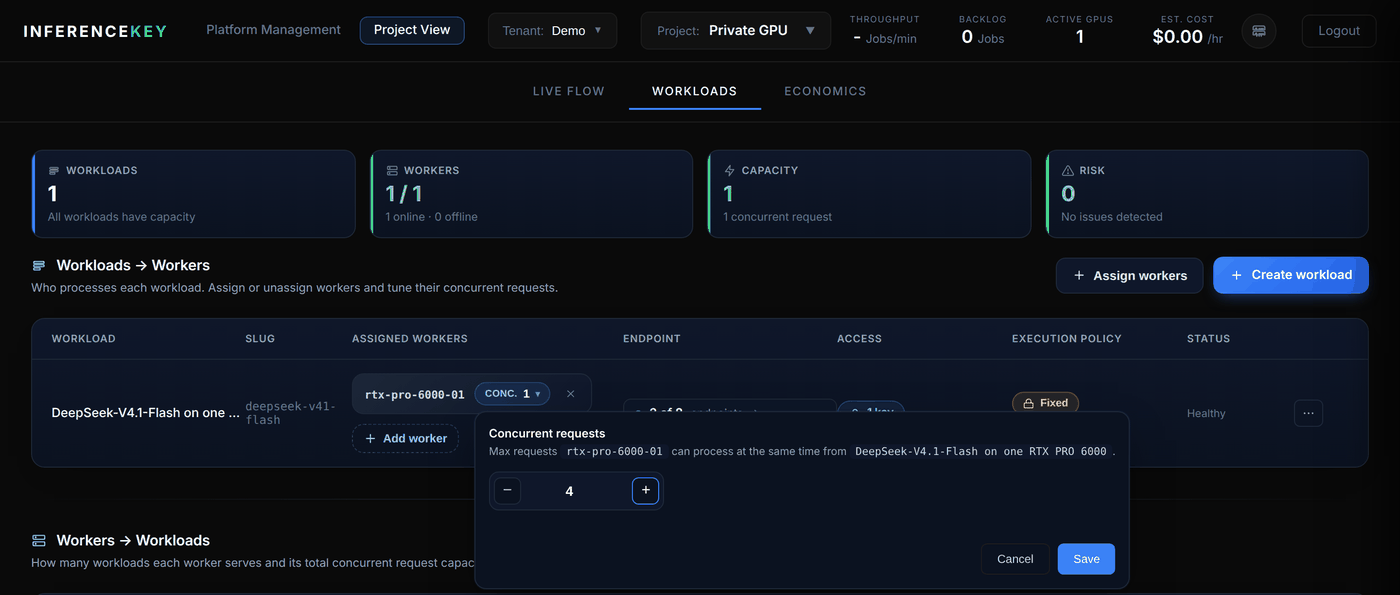
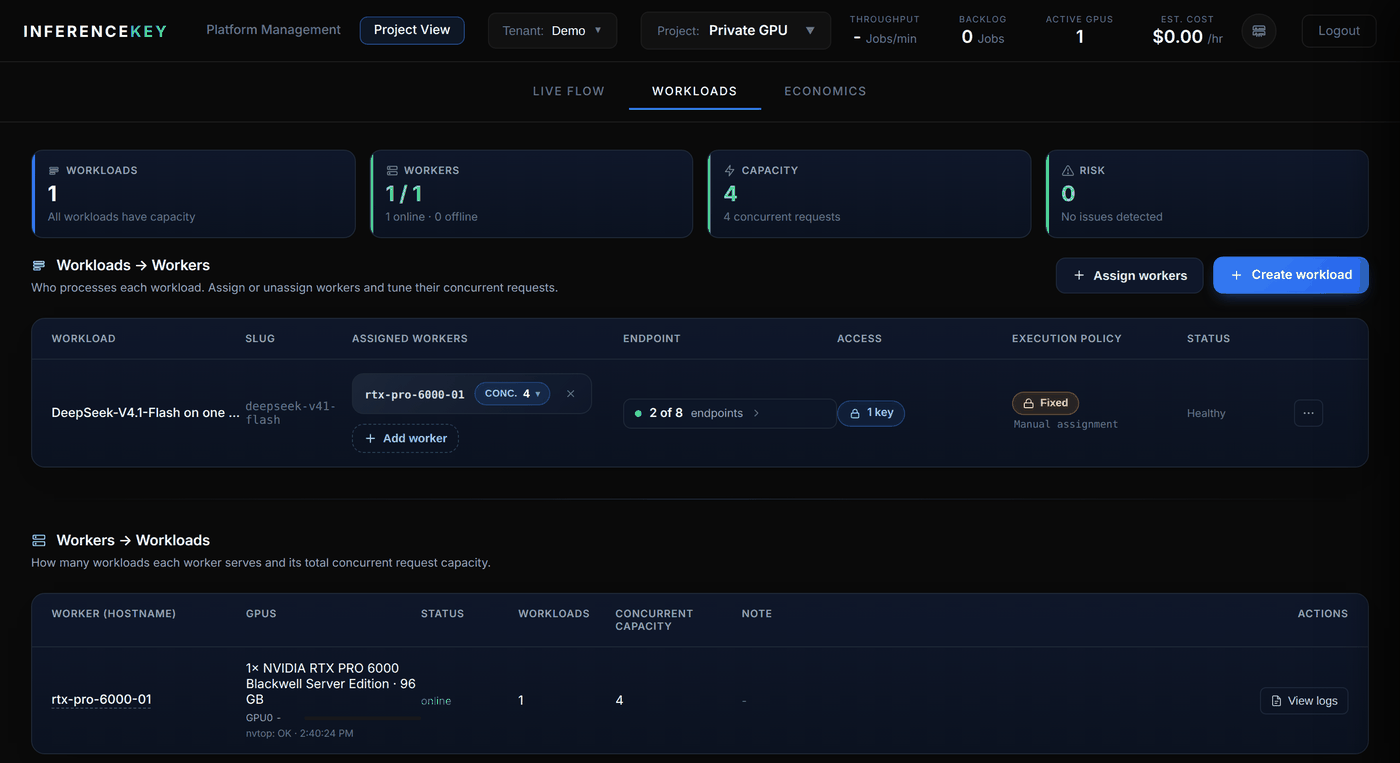
With 4 at once the engine measured 127.58 tokens/s in total, 31.87 for the slowest user.
Settings
Every class attribute of DeepSeekOneGpuBackend can be overridden with a DSV41_<NAME> variable in the worker’s environment (custom backends do not receive the workload’s config). The ones you are most likely to touch:
| Variable | Default | What it does |
|---|---|---|
DSV41_MODEL_DIR | (download) | Folder with the seven Q2_K GGUF files; skips the 264.5 GB download. |
DSV41_CACHE_DIR | ~/.cache/deepseek-one-gpu | Where the engine and the model are downloaded. |
DSV41_DEFAULT_MAX_TOKENS | 4096 | max_tokens for requests that do not set it. |
DSV41_SERVER_ENGINE | strata | mock starts a scripted engine, to check the wiring on a machine without the GPU. |
Quality and cost
On fixed-seed subsets the engine scores GSM8K 0.927, IFEval 0.800 and HumanEval 0.890, against 0.960, 0.853 and 0.982 for the full model on DeepSeek’s API. The stock llama.cpp fork on the same Q2_K file scores 0.878 on HumanEval, so the gap is the 2-bit quantization. Per token, DeepSeek’s API is cheaper than a rented RTX PRO 6000 (cost comparison); this setup is for data that must stay on your machine and capacity you do not share. Video: 3:48.
Limits
- No streaming for custom backends yet (
"stream": true). - 300 s per request on the worker. When a request sets no
max_tokens, the backend uses 4,096 (about 215 s at the 19 tokens/s of a user among 8). Ask for less when 8 users share the card. - No tool calls. A request with
toolsis refused with 400. - The response’s own
usageis zero; use theusageinside the decoded content. - Non-OpenAI fields (
reasoning_effort,strata_reproducible, …) go in anextra_bodyobject of the request JSON. The OpenAI Python client’sextra_body=merges them into the top level instead, so send those requests as raw JSON.
Troubleshooting
| Symptom | Likely cause | Fix |
|---|---|---|
ensure() fails with scope_insufficient | The SDK token lacks workload:read. | Create a token with workload:read and workload:write. |
| The workload never leaves “Preparing backend” and the worker logs a readiness timeout | The first start (download and load) takes longer than the default 300 s. | Set INFERENCEKEY_CUSTOM_BACKEND_READY_TIMEOUT_SECS=7200 on the worker, or pre-download and set DSV41_MODEL_DIR. |
| Setup stops at the placement step | Not enough RAM for the minimum layout. | Use a host with about 280 GB of RAM. |
| One user gets far less than 63 tokens/s | The engine is not on the GPU’s NUMA node, or the host’s RAM is slow. | Check nvidia-smi topo -m and that numactl is installed; compare hosts. |
| Replies stop at 4,096 tokens | The request set no max_tokens, so the backend’s default applied. | Send max_tokens, or change DSV41_DEFAULT_MAX_TOKENS; keep each reply under the worker’s 300 s per request. |
Next steps
Credits: the offload method and the server come from Strata by Niko1221 and contributors, on top of llama.cpp and ggml, with vcruz305’s DeepSeek-V4.1 fork and Q2_K GGUF, and DeepSeek’s open weights.